


CleanPal
4.312.00 Reviews
App Specs
- Version
- 1.6.0
- Updated On
- License
- Free
- Downloads
- 100,000+
- Developer
- Lemuria Dev
- Categories
- Productivity
- Platform
- Android
Screenshots

 Analysis by AppCompare
I first looked at CleanPal as a practical answer to a familiar phone problem: storage fills gradually, and it is hard to tell which files are worth keeping. Its central idea is focused on reviewing storage files on your device. That makes it most useful when you want to understand what is taking up room before deciding what to do, rather than when you expect a general-purpose tool to manage every part of your phone.
That distinction matters. A storage review is not the same thing as blindly deleting anything an app labels as clutter. I would use a tool like this as a prompt to inspect and make deliberate choices, especially when the phone holds photos, downloads, and documents I might need later. The useful outcome is not simply a cleaner-looking screen; it is knowing which files deserve attention and avoiding a rushed cleanup that removes something important.
Why a storage review can be more useful than a one-tap cleanup
When space gets tight, the obvious temptation is to tap a large cleanup button and hope for the best. I prefer a more careful approach: start by reviewing what is on the device, then decide whether a file is safe to remove. That is the capability that gives this app a clear purpose. It puts storage housekeeping at the center instead of asking you to treat every slow moment or battery concern as part of one broad maintenance problem.
This can be especially helpful if you have accumulated files over months without a clear system. A downloaded document may be easy to forget, while a duplicate photo or an old installer can sit unnoticed. Reviewing storage gives you a reason to pause and sort those items into “keep,” “remove,” and “check later.” I find that small bit of intention more valuable than a cleanup routine that encourages speed over judgment.
How I would work through a cleanup
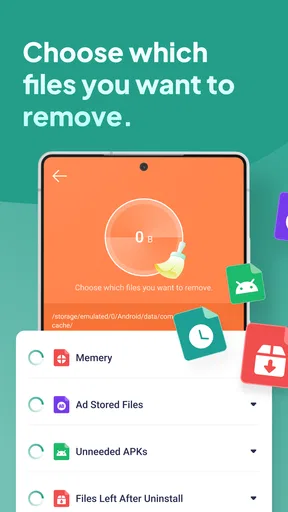
I would begin by opening the storage review when I have a few quiet minutes, rather than while rushing out the door or trying to free room for an urgent download. The key is to treat the scan as a starting point, not as permission to delete everything presented for attention. I would inspect unfamiliar items, keep personal files whose purpose I recognize, and only remove things I can confidently identify as disposable.
A useful habit is to clean in small passes. First, look for files connected to a task that has already ended, such as a document downloaded for a trip or an installation file left behind after an app was set up. Then revisit media and large personal folders separately, because those are more likely to contain things you care about. This staged approach reduces the chance of making a regrettable choice just because a storage warning appeared.
I would also avoid turning cleanup into a daily ritual. If the phone is working normally and there is enough room for what you need, there is little reason to inspect storage constantly. A review is most useful when you notice space getting tight, when you have finished a file-heavy project, or before you need room for something specific. That makes the app a practical maintenance aid rather than another source of chores.
Worth Reading Before You Choose

Flipboard Shows What News Apps Must Do Beyond the Feed

Switching to Android Auto Means Rethinking Your Driving Routine

Google Calendar Makes a Crowded Week Easier to Manage

Ludo King Makes the Most of the Minutes Between Plans

Baby Panda World Brings Quick Play to Modern Phones, but Its Game Library Feels Busy

ESPN’s Live Game View Makes Following Close Games Easier
Making Sense of CleanPal
So, what exactly does CleanPal do? Imagine having a personal assistant, but instead of organizing your schedule, it declutters your phone. From clearing out junk files to optimizing memory, this app does it all. When I first installed it, I was a bit skeptical. I mean, how much junk could really be on my phone? But boy, was I surprised!
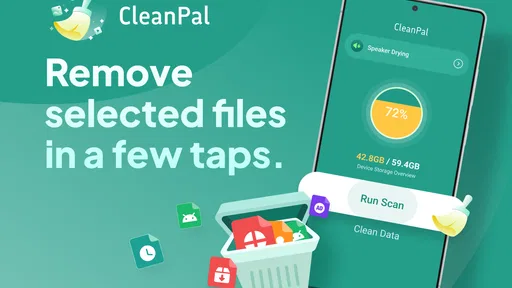
CleanPal comes with a user-friendly interface that even your grandma could navigate. Once you open it, you’re greeted with a dashboard that gives you a quick overview of your phone’s health. It shows how much storage you’re using, how much RAM is free, and even your device’s battery status. It’s like having a full check-up at the tip of your fingers.
Key Features that Stand Out
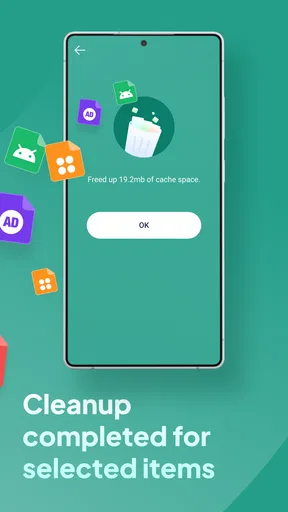
One feature that really caught my attention was the Junk Cleaner. This tool scans your device for those pesky cache files, residuals from uninstalled apps, and other unnecessary files hogging your memory. With just one tap, I freed up over a gigabyte of space! Seriously, where was all this hiding?
Then there’s the Memory Booster. If you’ve ever noticed your phone lagging or apps crashing, this is your go-to tool. It clears up RAM by closing background apps that you’re not using. After running this feature, my phone felt snappier, like it had a shot of espresso.
And let’s not forget the Battery Saver. This nifty feature identifies apps that are draining your battery and suggests optimizations to extend your battery life. After following the suggestions, I noticed a significant increase in my phone’s battery performance throughout the day.
Security and Privacy
In today’s digital age, security is paramount. CleanPal doesn’t just stop at cleaning; it also takes care of your privacy. The app includes a security feature that scans for potential threats and vulnerabilities on your device. While my phone was thankfully threat-free, it's nice to have that peace of mind knowing there’s an extra layer of protection.
User Experience
Let’s talk about the overall experience. From the moment you open the app, everything feels intuitive. There’s no fumbling around or second-guessing where to tap next. The design is sleek, modern, and not cluttered with unnecessary ads, which is a big win in my book.
Another thing I appreciated was the gentle reminders to perform regular clean-ups. It’s like having a friendly nudge that doesn’t feel intrusive. Plus, the app doesn’t bombard you with push notifications, so you can enjoy a clutter-free notification bar too.
Where a storage tool fits into everyday life
Picture finishing a week of work with several downloaded files still sitting on your phone: a meeting handout, a draft you have already sent, and a document you saved to read on the train. Before deleting anything, I would use the review to check what is there, open or recognize the files, and remove only the items that have served their purpose. That is a more dependable workflow than clearing a folder by name alone, especially when work and personal downloads share the same space.
Another sensible moment is before a long trip. Offline maps, tickets, and saved reading may matter more than an old download, so the point is not to make the phone look empty. It is to make room for the things you are about to use. I would review first, preserve travel essentials, and leave uncertain files untouched until I can check them properly. The practical benefit is control over storage, not an excuse to erase aggressively.
This also helps answer a common question: should you use a storage-review app instead of the phone’s built-in storage screen? If you already know how to find large files and sort them in your device settings, that built-in route may be enough. CleanPal makes more sense if you want a dedicated place to focus on storage housekeeping and prefer a guided, approachable starting point. I would still treat the phone’s own file manager as the final place to verify anything personal before removing it.
The trade-offs I would keep in mind
Any cleanup suggestion involves a judgment call. A file that looks unnecessary can still be useful, and a category that seems safe to clear may contain something you would rather keep. My rule is simple: if I cannot identify an item, I do not delete it just to improve a number on a screen. This is particularly important for personal photos, work documents, and files saved for offline access.
There is also a difference between freeing storage and fixing performance. If a phone feels slow because it is old, overloaded with active apps, or affected by a separate software issue, reviewing files may not solve the underlying cause. I would not install a storage tool expecting it to repair every slowdown or extend battery life in every situation. It is best judged by how well it supports a careful review of files, not by promises of a universal cure.
Compared with manually browsing folders, a dedicated review can make the task feel less scattered. Compared with automatic cleaners, a review-first approach encourages more caution, but it may take longer because you need to think about what you are removing. That is a worthwhile trade-off for anyone whose phone contains important personal or work material. If your only goal is to delete one file you already know how to find, opening the built-in file manager will probably be quicker.
CleanPal is a free productivity app from Lemuria Dev. It is rated for Everyone, and its current version is 1.6.0; it has an average rating of 4.3 from 209 ratings, with 12 written reviews and over 100K installs. It was released on March 13, 2026, and supports Android 7.0 and newer. Those details make it accessible to a broad range of Android users, while the focused storage-review purpose is the more important reason to consider it.
Who is most likely to benefit
I would recommend trying it if you regularly forget what you downloaded, tend to run low on storage, or want a more deliberate way to review files before removing them. It may also suit someone who is comfortable making their own decisions but would rather begin from a focused storage tool than hunt through several settings screens. The best results come from taking a moment to recognize files and using the app as a guide, not handing over responsibility for personal data.
I would skip it if you are already happy managing storage with your phone’s file manager, or if you expect a single tap to make a slow device feel new again. It is also not the right fit for someone who wants automatic deletion without checking what is being removed. In those cases, the built-in tools or a more specific solution for the underlying problem will be a better match.
Before installing any file-cleanup app, I would ask myself what I actually want to accomplish: make room for a download, locate forgotten files, or simply understand what is filling the device. That question helps set a realistic expectation. A storage review can support those tasks, but the final choice about what stays should remain yours. Keeping that boundary makes cleanup safer and more useful.
Final Thoughts
In a world where our phones are our lifelines, keeping them in tip-top shape is crucial. CleanPal is a fantastic app for anyone looking to optimize their device without the hassle of digging through settings and menus. It’s efficient, easy to use, and offers a comprehensive solution to phone maintenance.
If you’re tired of your phone feeling sluggish, or just want to ensure it’s running at its best, give CleanPal a try. It’s like having a mini tech wizard in your pocket, ready to zap away all your phone’s woes. Download it today and see the magic for yourself!
My more measured recommendation is to try it when storage review is the task you actually need, and to approach every suggested cleanup with care. I would not treat the app as a replacement for checking important files or as a guaranteed fix for unrelated phone problems. Used thoughtfully, it can make storage housekeeping feel less intimidating; used indiscriminately, any cleaner can encourage choices you later regret. For me, that difference is the reason to review first and delete second.
Pros
- User-friendly interface enhances usability.
- Efficiently clears cache and junk files.
- Improves device performance noticeably.
- Customizable cleaning options available.
- Supports multiple languages for accessibility.
Cons
- Occasional ads can disrupt experience.
- Limited features in free version.
- May drain battery during deep clean.
- No real-time monitoring option.
- Requires frequent updates for new features.
FAQs for CleanPal
What is CleanPal and what does it offer?
CleanPal is a comprehensive cleaning and optimization app designed for Android and iOS devices. It offers features such as junk file removal, memory optimization, battery saving, and app management. Its user-friendly interface makes it easy for users to enhance their device's performance and maintain optimal functionality.
Is CleanPal safe to use on my device?
Yes, CleanPal is safe to use on both Android and iOS devices. The app is developed with security and privacy in mind, ensuring that no personal data is compromised during its operation. It is also regularly updated to address any potential vulnerabilities and enhance user safety.
Can CleanPal really improve my device's performance?
CleanPal can significantly improve your device's performance by removing unnecessary files, managing background apps, and optimizing memory usage. Users often notice faster loading times and smoother overall operation after regular use of the app. However, results may vary based on individual device conditions and usage patterns.
Does CleanPal require a subscription or is it free to use?
CleanPal offers a free version with basic features, which is sufficient for general cleaning and optimization tasks. However, for users seeking more advanced functionalities, a premium subscription is available. This includes features like advanced app management, deeper cleaning options, and priority customer support.
How does CleanPal handle user data and privacy?
CleanPal prioritizes user privacy by ensuring that no personal data is collected without consent. The app operates under strict privacy policies and complies with all relevant data protection regulations. Users can review these policies within the app to understand how their data is managed and protected.


